I have recently been investigating building or purchasing a 60% keyboard.
Before committing to this investment, I wanted to get an idea of how much I
actually use the keys outside of the 60% layout. There may have been some
kind of tool to show me this but I decided to whip up a very rudimentary
keylogger and let it run for a few hours while I used my computer.
#!/bin/sh

id=$(xinput --list |grep 'USB Keyboard' |head -1 |grep -oP '(?<=id=)\d+')
xinput --test $id >> ~/Documents/keylog.txt
I did say it was rudimentary. Better data might be attained with a better
method of logging keystrokes, as xinput seems to regard holding a key down as
a long series of press and release events rather than a single one. After
collecting the data for a few hours I created a script to put the data into a
useful format for me to digest.
#!/usr/bin/env perl

package KeyMap;

use 5.010;
use strict;
use warnings;

use SVG;

sub new {
  my ($class, @args) = @_;

  my $self = bless {
    presses => [],
    total   => 0,
    svg     => SVG->new(
      width  => 940,
      height => 300,
      @args,
    ),
  }, $class;
}

sub svg { shift->{svg} }

sub make_key {
  my ($self, $x, $y, $w, $h, $text, $color) = @_;

  my ($r, $g, $b) = @$color;
  my $tcol = $color->[3] ? '#fff' : '#000';

  $self->svg->rectangle(
    x      => $x + 2,
    y      => $y + 2,
    width  => $w - 4,
    height => $h - 4,
    rx     => 5,
    ry     => 5,
    style  => {
      stroke => '#000',
      fill   => "rgb($r,$g,$b)",
    });

  $self->svg->text(
    x     => $x + $w / 2,
    y     => $y + $h / 2 + 3,
    style => {
      'fill'        => $tcol,
      'text-align'  => 'center',
      'text-anchor' => 'middle',
      'font-family' => 'Noto Sans',
      'font-size'   => '10px',
    },
  )->cdata($text);
}

sub make_row {
  my ($self, $x, $y, @keys) = @_;

  foreach (@keys) {
    $_ = [ $_, 1, 1 ] unless ref $_;
    my ($code, $w, $h) = @$_;
    $w ||= 1;
    $h ||= 1;

    $self->make_key($x, $y, $w * 40, $h * 40,
      sprintf('%0.2f', $self->percent($code)),
      $self->color($code));
    $x += $w * 40;
  }
}

sub add_key_press {
  my ($self, $code) = @_;

  $self->{presses}[$code]++;
  $self->{total}++;

  delete $self->{max_percent};
}

sub presses { shift->{presses}[shift] || 0 }
sub total { shift->{total} }

sub max_percent {
  my ($self) = @_;

  return $self->{max_percent} if exists $self->{max_percent};

  my $max = 0;
  for (@{ $self->{presses} }) {
    $max = $_ if $_ and $_ > $max;
  }

  return $self->{max_percent} = $max / $self->total * 100;
}

sub percent {
  my ($self, $code) = @_;

  return $self->presses($code) / $self->total * 100;
}

sub color {
  my ($self, $code) = @_;

  # Crazy exponential scaling gotten experimentally
  my $scale = ($self->percent($code) / $self->max_percent) ** 0.3;

  my ($r, $gb, $t);

  if ($scale > 0.66) {
    $r = 255 - int(128 * ($scale - 0.66) / 0.33);
    $gb = 0;
    $t = 1;
  } else {
    $r = 255;
    $gb = 255 - int(255 * $scale / 0.66);
    $t = 0;
  }

  return [ $r, $gb, $gb, $t ];
}

sub render {
  my ($self) = @_;

  # base keys
  $self->make_row(20, 80, 49, 10 .. 21, [ 22, 2 ]);
  $self->make_row(20, 120, [ 23, 1.5 ],  24 .. 35, [ 51, 1.5 ]);
  $self->make_row(20, 160, [ 66, 1.75 ], 38 .. 48, [ 36, 2.25 ]);
  $self->make_row(20, 200, [ 50, 2.25 ], 52 .. 61, [ 62, 2.75 ]);
  $self->make_row(
    20,
    240,
    [ 37,  1.25 ],
    [ 133, 1.25 ],
    [ 64,  1.25 ],
    [ 65,  6.25 ],
    [ 108, 1.25 ],
    [ 134, 1.25 ],
    [ 135, 1.25 ],
    [ 105, 1.25 ]);

  # function keys
  $self->make_row(20,  20, 9);
  $self->make_row(100, 20, 67 .. 70);
  $self->make_row(280, 20, 71 .. 74);
  $self->make_row(460, 20, 75, 76, 95, 96);

  # navigation
  $self->make_row(630, 20,  107, 78,  127);
  $self->make_row(630, 80,  118, 110, 112);
  $self->make_row(630, 120, 119, 115, 117);
  $self->make_row(670, 200, 111);
  $self->make_row(630, 240, 113, 116, 114);

  # number pad
  $self->make_row(760, 80, 77, 106, 63, 82);
  $self->make_row(760, 120, 79 .. 81, [ 86,  1, 2 ]);
  $self->make_row(760, 160, 83 .. 85);
  $self->make_row(760, 200, 87 .. 89, [ 104, 1, 2 ]);
  $self->make_row(760, 240, [ 90, 2 ], 91);
}

sub xmlify {
  my ($self, @args) = @_;

  return $self->svg->xmlify(@args);
}

package main;

use strict;
use warnings;
use autodie;

my $INPUT  = "$ENV{HOME}/Documents/keylog.txt";
my $OUTPUT = "$ENV{HOME}/Documents/keyfreq.svg";

open my $output, '>', $OUTPUT;
open my $input, '<', $INPUT;

my $map = KeyMap->new();
while (<$input>) {
  $map->add_key_press($1) if /^key release\s+(\d+)\s+$/;
}

close $input;

$map->render;
print $output $map->xmlify;

close $output;
This script reads the keylog and creates a "heat map" of which keys I actually
pressed. Here is the generated image:
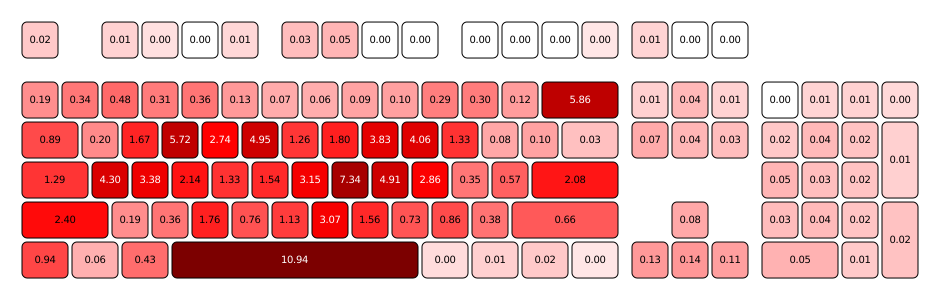
Update: I have regenerated the map with a few days of data to give a better
view of my usage.
Some notes before interpreting the data:
I have my caps lock mapped to super (windows key) because it is the modifier I
use for my window manager functions. I do not actually turn caps lock on and
off that frequently.
I have my escape and tilde (left of number 1) keys swapped. I'm not sure I
like this just yet as I type ~ more often than I had realized.
I only had the keylogger running while I was doing work-type things. I boot
into Windows if I am going to play games and I did not log any data during
those times although I'm not sure the differences would be significant.
All in all I think this really shows how little keys are used outside of the
60% layout area (at least by me during the time of this experiment). In any
case, this has strengthened my resolve to acquire a 60% keyboard.
In light of the recent heartbleed bug, I have taken an opportunity to
review my server configuration and ensure that everything is up to snuff. To
facilitate this, I used the wonderful Qualys SSL Labs tool. Their best
practices seemed extremely reasonable to me so I set out to ensure I was
following all of them
First of all, I had to make new server keys and certs because of the potential
that they were compromised. Personally, I can never remember how to work the
openssl command line tool so I have set up a makefile to do all that nonsense
for me:
BITSIZE=4096
FILE=eatabrick.org

all: $(FILE).pem $(FILE).key dhparam.pem
  chown http:http $(FILE).*
  chmod 600 $(FILE).key

$(FILE).pem: $(FILE).csr intermediate.pem
  @echo "Copy and paste the following into your CA:"
  @cat $(FILE).csr
  @echo "Paste the certificate from your CA here (^D to finish):"
  @cat >$(FILE).pem
  @cat intermediate.pm >>$(FILE).pem

$(FILE).csr: $(FILE).key
  openssl req -new -key $(FILE).key -out $(FILE).csr

$(FILE).key:
  openssl genrsa -des3 -passout pass:x -out $(FILE).pass.key $(BITSIZE)
  openssl rsa -passin pass:x -in $(FILE).pass.key -out $(FILE).key
  rm $(FILE).pass.key

intermediate.pem:
  @echo "Paste any intermediate certs here (^D to finish):"
  @cat >intermediate.pem

dhparam.pem:
  openssl dhparam -out dhparam.pem $(BITSIZE)

clean:
  rm $(FILE).* intermediate.pem dhparam.pem
This makes my life much easier since I can just make clean all when it's time
for new certs. The dhparam.pem rule is because nginx by default uses
openssl's default DH parameters which are only 1024 bit and that will weaken the
security of clients using ephemeral keys which kind of defeats the purpose.
With the certs in place, I have the following nginx configuration:
server {
  listen 80 default;
  listen [::]:80 default;

  server_name eatabrick.org www.eatabrick.org;
  rewrite ^/(.*) https://eatabrick.org/$1 permanent;
}

server {
  listen 443 ssl;
  listen [::]:443 ssl;

  server_name www.eatabrick.org;

  ssl_certificate /etc/nginx/ssl/eatabrick.org.pem;
  ssl_certificate_key /etc/nginx/ssl/eatabrick.org.key;

  ssl_protocols TLSv1 TLSv1.1 TLSv1.2;
  ssl_prefer_server_ciphers on;
  ssl_ciphers 'ECDHE-RSA-AES256-GCM-SHA384:ECDHE-RSA-AES128-GCM-SHA256:DHE-RSA-AES256-GCM-SHA384:DHE-RSA-AES128-GCM-SHA256:ECDHE-RSA-AES256-SHA384:ECDHE-RSA-AES128-SHA256:ECDHE-RSA-AES256-SHA:ECDHE-RSA-AES128-SHA:DHE-RSA-AES256-SHA256:DHE-RSA-AES128-SHA256:DHE-RSA-AES256-SHA:DHE-RSA-AES128-SHA:ECDHE-RSA-DES-CBC3-SHA:EDH-RSA-DES-CBC3-SHA:AES256-GCM-SHA384:AES128-GCM-SHA256:AES256-SHA256:AES128-SHA256:AES256-SHA:AES128-SHA:DES-CBC3-SHA:HIGH:!aNULL:!eNULL:!EXPORT:!CAMELLIA:!DES:!MD5:!PSK:!RC4:!3DES';
  ssl_session_cache shared:SSL:10m;
  ssl_dhparam /etc/nginx/ssl/dhparam.pem;

  ssl_stapling on;

  add_header Strict-Transport-Security max-age=31536000;
  add_header X-Frame-Options DENY;

  rewrite ^/(.*) https://eatabrick.org/$1 permanent;
}

server {
  listen 443 ssl default;
  listen [::]:443 ssl default;

  server_name eatabrick.org;

  ssl_certificate /etc/nginx/ssl/eatabrick.org.pem;
  ssl_certificate_key /etc/nginx/ssl/eatabrick.org.key;

  ssl_protocols TLSv1 TLSv1.1 TLSv1.2;
  ssl_prefer_server_ciphers on;
  ssl_ciphers 'ECDHE-RSA-AES256-GCM-SHA384:ECDHE-RSA-AES128-GCM-SHA256:DHE-RSA-AES256-GCM-SHA384:DHE-RSA-AES128-GCM-SHA256:ECDHE-RSA-AES256-SHA384:ECDHE-RSA-AES128-SHA256:ECDHE-RSA-AES256-SHA:ECDHE-RSA-AES128-SHA:DHE-RSA-AES256-SHA256:DHE-RSA-AES128-SHA256:DHE-RSA-AES256-SHA:DHE-RSA-AES128-SHA:ECDHE-RSA-DES-CBC3-SHA:EDH-RSA-DES-CBC3-SHA:AES256-GCM-SHA384:AES128-GCM-SHA256:AES256-SHA256:AES128-SHA256:AES256-SHA:AES128-SHA:DES-CBC3-SHA:HIGH:!aNULL:!eNULL:!EXPORT:!CAMELLIA:!DES:!MD5:!PSK:!RC4:!3DES';
  ssl_session_cache shared:SSL:10m;
  ssl_dhparam /etc/nginx/ssl/dhparam.pem;

  ssl_stapling on;

  add_header Strict-Transport-Security max-age=31536000;
  add_header X-Frame-Options DENY;

  access_log /var/log/nginx/eatabrick.org.access.log;
  error_log /var/log/nginx/eatabrick.org.error.log;

  root /srv/http/eatabrick.org/htdocs/;
  index index.html;
  error_page 404 /404.html;
}
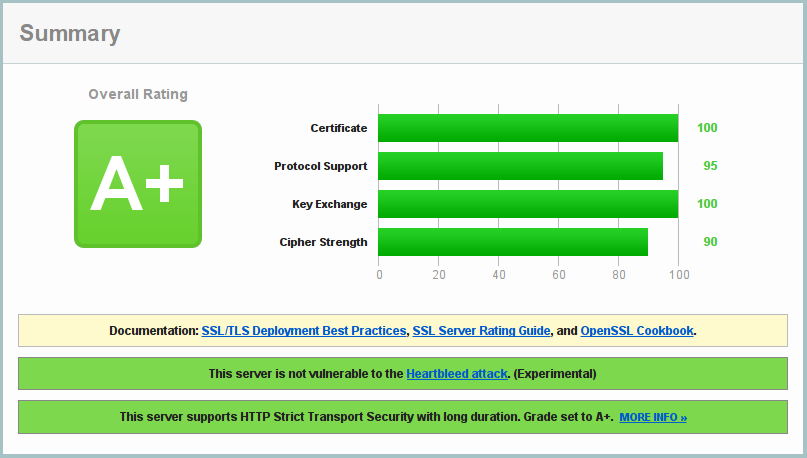
This configuration has netted me a coveted A+ from Qualys:
However, I did have to make some compromises to do this.
First, I have disabled use of SSLv3 (because it is broken). This precludes IE6
from accessing eatabrick.org. I cannot think of anything less controversial
than this. If for some reason you need to support people using IE6 you should
review your life choices. According to Qualys, this also precludes YandexBot
3.0, which is apparently a bot from a Russian search engine. This is more
unfortunate than not supporting IE6 but not so much that I am going to use a
broken protocol.
Second, as mentioned earlier, I am using 4096 bit DH parameters to match my 4096
bit key. This apparently precludes Java 6u45 from connecting. As far as I am
aware Java 6 is no longer supported so it's probably time for any clients using
this to upgrade to something less broken.
Lastly, I have excluded 3DES from the list of ciphers my server is willing to
use. This was probably not entirely necessary since 3DES is not really broken
but it does use 112 (or 108) bit keys which are a tad too small for my taste so
it got the axe. This precludes IE8 on Windows XP from connecting. As with the
other sacrifices, this product is no longer supported by its makers so I see no
reason for it to be supported by me.
We had a taco bar and salsa contest at work today so I made some salsa verde.
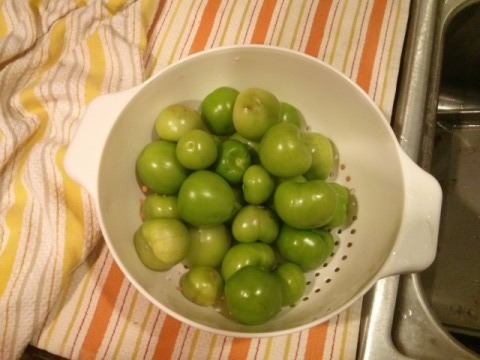
First, husk and rinse a bunch of tomatillos. I used a pound and a half.
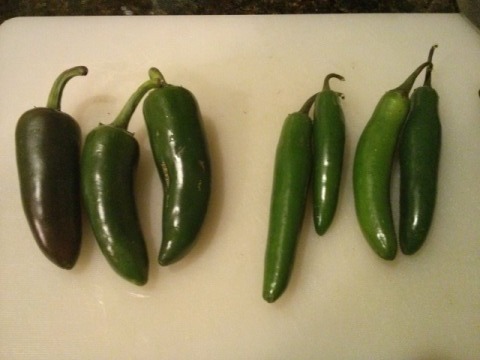
Cut up a bunch of peppers. You can take the seeds out if you are a wuss.
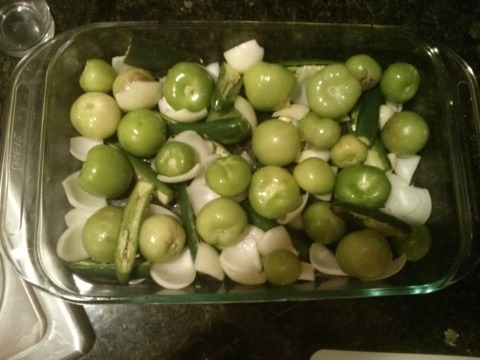
Add an onion and some garlic and salt to taste. Put it all in a baking dish
with a bit of oil.
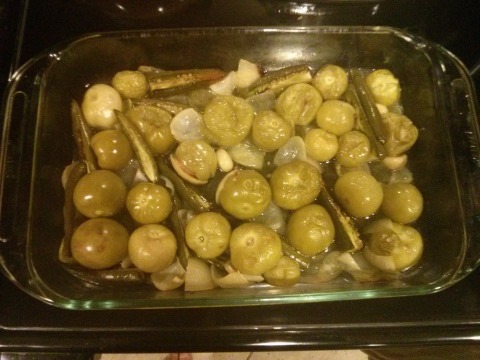
Roast everything at 375°F until the tomatillos are squishy (about 45
minutes).
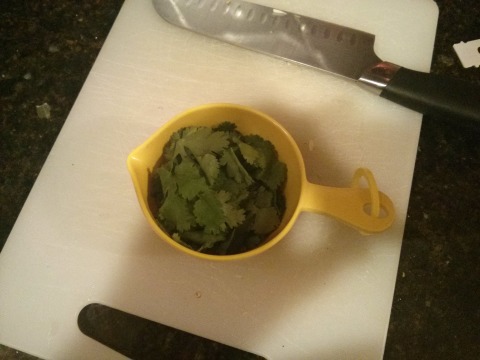
Add a cup of fresh cilantro.
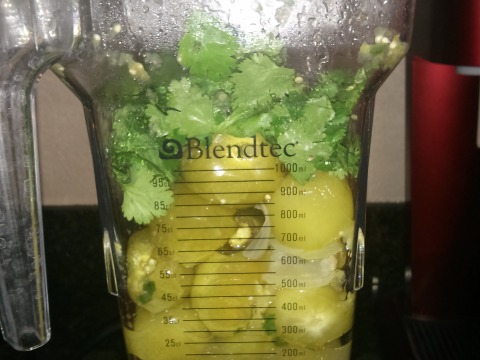
Blend it all together.
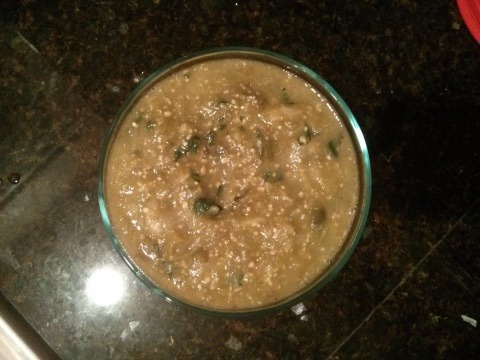
Delicious.
gfk
2013-09-07
I made a new thing. It is called gfk. You can read about it at
gfk.eatabrick.org.
In case you hate clicking links, it's basically a system for storing secret
files on a USB drive so that your private keys have two factor authentication.
My goal now is to put something on here before another year passes.
When I moved all of my servers away from apache2, I started using blosxom in
static mode. There's no dynamic content on this blog anyway, so there wasn't
much sense in trying to get the CGI to cooperate with nginx. As such, I made a
Makefile to build and deploy the site for me, which was pretty rad.
The site is also maintained in a git repository, though, and so I had the idea
that pushing to the git repo should just automatically update the website.
Here, I will share how I achieved this awesome magic.
First of all, I had to make a few changes to blosxom to get it to play nice with
a git repository.
- Use post filename to get post time (this is
20120604_blosxom_git.txt)
- Allow for a relative path for the data directory
- Rebuild static files older than the most recent template mtime
Here is my modified blosxom (based on 2.0):
#!/usr/bin/perl
# Blosxom
# Author: Rael Dornfest <rael@oreilly.com>
# Version: 2.0
# Home/Docs/Licensing: http://www.raelity.org/apps/blosxom/
package blosxom;
# --- Configurable variables -----
# What's this blog's title?
$blog_title = "eatabrick.org";
# What's this blog's description (for outgoing RSS feed)?
$blog_description = "For to be to make you smarter. For to be to get you dead.";
# What's this blog's primary language (for outgoing RSS feed)?
$blog_language = "en";
# Where are this blog's entries kept?
$datadir = "data";
# What's my preferred base URL for this blog (leave blank for automatic)?
$url = "http://eatabrick.org/";
# Should I stick only to the datadir for items or travel down the
# directory hierarchy looking for items? If so, to what depth?
# 0 = infinite depth (aka grab everything), 1 = datadir only, n = n levels down
$depth = 0;
# How many entries should I show on the home page?
$num_entries = 5;
# What file extension signifies a blosxom entry?
$file_extension = "txt";
# What is the default flavour?
$default_flavour = "html";
# Should I show entries from the future (i.e. dated after now)?
$show_future_entries = 0;
# --- Plugins (Optional) -----
# Where are my plugins kept?
$plugin_dir = "plugins";
# Where should my modules keep their state information?
$plugin_state_dir = "$plugin_dir/state";
# --- Static Rendering -----
# Where are this blog's static files to be created?
$static_dir = "htdocs";
# What's my administrative password (you must set this for static rendering)?
$static_password = "awesome";
# What flavours should I generate statically?
@static_flavours = qw/html rss/;
# Should I statically generate individual entries?
# 0 = no, 1 = yes
$static_entries = 1;
# --------------------------------
use vars qw! $version $blog_title $blog_description $blog_language $datadir $url %template $template $depth $num_entries $file_extension $default_flavour $static_or_dynamic $plugin_dir $plugin_state_dir @plugins %plugins $static_dir $static_password @static_flavours $static_entries $path_info $path_info_yr $path_info_mo $path_info_da $path_info_mo_num $flavour $static_or_dynamic %month2num @num2month $interpolate $entries $output $header $show_future_entries %files %indexes %others !;
use strict;
use DateTime;
use FileHandle;
use File::Find;
use File::stat;
use List::Util 'max';
use Time::localtime;
use CGI qw/:standard :netscape/;
$version = "2.0";
my $fh = new FileHandle;
%month2num = (nil=>'00', Jan=>'01', Feb=>'02', Mar=>'03', Apr=>'04', May=>'05', Jun=>'06', Jul=>'07', Aug=>'08', Sep=>'09', Oct=>'10', Nov=>'11', Dec=>'12');
@num2month = sort { $month2num{$a} <=> $month2num{$b} } keys %month2num;
# Use the stated preferred URL or figure it out automatically
$url ||= url();
$url =~ s/^included:/http:/; # Fix for Server Side Includes (SSI)
$url =~ s!/$!!;
# Drop ending any / from dir settings
$datadir =~ s!/$!!; $plugin_dir =~ s!/$!!; $static_dir =~ s!/$!!;
# Fix depth to take into account datadir's path
$depth and $depth += ($datadir =~ tr[/][]) - 1;
# Global variable to be used in head/foot.{flavour} templates
$path_info = '';
$static_or_dynamic = (!$ENV{GATEWAY_INTERFACE} and param('-password') and $static_password and param('-password') eq $static_password) ? 'static' : 'dynamic';
$static_or_dynamic eq 'dynamic' and param(-name=>'-quiet', -value=>1);
# Path Info Magic
# Take a gander at HTTP's PATH_INFO for optional blog name, archive yr/mo/day
my @path_info = split m{/}, path_info() || param('path');
shift @path_info;
while ($path_info[0] and $path_info[0] =~ /^[a-zA-Z].*$/ and $path_info[0] !~ /(.*)\.(.*)/) { $path_info .= '/' . shift @path_info; }
# Flavour specified by ?flav={flav} or index.{flav}
$flavour = '';
if ( $path_info[$#path_info] =~ /(.+)\.(.+)$/ ) {
$flavour = $2;
$1 ne 'index' and $path_info .= "/$1.$2";
pop @path_info;
} else {
$flavour = param('flav') || $default_flavour;
}
# Strip spurious slashes
$path_info =~ s!(^/*)|(/*$)!!g;
# Date fiddling
($path_info_yr,$path_info_mo,$path_info_da) = @path_info;
$path_info_mo_num = $path_info_mo ? ( $path_info_mo =~ /\d{2}/ ? $path_info_mo : ($month2num{ucfirst(lc $path_info_mo)} || undef) ) : undef;
# Define standard template subroutine, plugin-overridable at Plugins: Template
$template =
sub {
my ($path, $chunk, $flavour) = @_;
do {
return join '', <$fh> if $fh->open("< $datadir/$path/$chunk.$flavour");
} while ($path =~ s/(\/*[^\/]*)$// and $1);
return join '', ($template{$flavour}{$chunk} || $template{error}{$chunk} || '');
};
# Bring in the templates
%template = ();
while (<DATA>) {
last if /^(__END__)?$/;
my($ct, $comp, $txt) = /^(\S+)\s(\S+)\s(.*)$/;
$txt =~ s/\\n/\n/mg;
$template{$ct}{$comp} = $txt;
}
# Plugins: Start
if ( $plugin_dir and opendir PLUGINS, $plugin_dir ) {
foreach my $plugin ( grep { /^\w+$/ && -f "$plugin_dir/$_" } sort readdir(PLUGINS) ) {
my($plugin_name, $off) = $plugin =~ /^\d*(\w+?)(_?)$/;
my $on_off = $off eq '_' ? -1 : 1;
require "$plugin_dir/$plugin";
$plugin_name->start() and ( $plugins{$plugin_name} = $on_off ) and push @plugins, $plugin_name;
}
closedir PLUGINS;
}
# Plugins: Template
# Allow for the first encountered plugin::template subroutine to override the
# default built-in template subroutine
my $tmp; foreach my $plugin ( @plugins ) { $plugins{$plugin} > 0 and $plugin->can('template') and defined($tmp = $plugin->template()) and $template = $tmp and last; }
# Provide backward compatibility for Blosxom < 2.0rc1 plug-ins
sub load_template {
return &$template(@_);
}
# Hack to use first 8 digits of filename for mtime
sub ptime {
my ($file) = shift;
if ($file =~ /\/(\d{4})(\d\d)(\d\d)_/) {
return DateTime->new(year => $1, month => $2, day => $3, hour => 12)->epoch
}
mtime($file);
}
sub mtime { stat(shift)->mtime }
# Define default find subroutine
$entries =
sub {
my(%files, %indexes, %others, $tmtime);
$tmtime = max(map mtime("$datadir/$_.$static_flavours[0]"), qw'head foot story');
find( {
wanted => sub {
my $d;
my $curr_depth = $File::Find::dir =~ tr[/][];
return if $depth and $curr_depth > $depth;
my $mtime = max(mtime($File::Find::name), $tmtime);
if (
# a match
$File::Find::name =~ m!^$datadir/(?:(.*)/)?(.+)\.$file_extension$!
# not an index, .file, and is readable
and $2 ne 'index' and $2 !~ /^\./ and (-r $File::Find::name)
) {
# to show or not to show future entries
(
$show_future_entries
or ptime($File::Find::name) < time
)
# add the file and its associated mtime to the list of files
and $files{$File::Find::name} = ptime($File::Find::name)
# static rendering bits
and (
param('-all')
or !-f "$static_dir/$1/index." . $static_flavours[0]
or mtime("$static_dir/$1/index." . $static_flavours[0]) < $mtime
)
and $indexes{$1} = 1
and $d = join('/', (nice_date($files{$File::Find::name}))[5,2,3])
and $indexes{$d} = $d
and $static_entries and $indexes{ ($1 ? "$1/" : '') . "$2.$file_extension" } = 1
}
else {
!-d $File::Find::name and -r $File::Find::name and $others{$File::Find::name} = ptime($File::Find::name)
}
},
no_chdir => 1,
}, $datadir );
return (\%files, \%indexes, \%others);
};
# Plugins: Entries
# Allow for the first encountered plugin::entries subroutine to override the
# default built-in entries subroutine
my $tmp; foreach my $plugin ( @plugins ) { $plugins{$plugin} > 0 and $plugin->can('entries') and defined($tmp = $plugin->entries()) and $entries = $tmp and last; }
my ($files, $indexes, $others) = &$entries();
%files = %$files; %indexes = %$indexes; %others = ref $others ? %$others : ();
# Plugins: Filter
foreach my $plugin ( @plugins ) { $plugins{$plugin} > 0 and $plugin->can('filter') and $entries = $plugin->filter(\%files, \%others) }
# Static
if (!$ENV{GATEWAY_INTERFACE} and param('-password') and $static_password and param('-password') eq $static_password) {
param('-quiet') or print "Blosxom is generating static index pages...\n";
# Home Page and Directory Indexes
my %done;
foreach my $path ( sort keys %indexes) {
my $p = '';
foreach ( ('', split /\//, $path) ) {
$p .= "/$_";
$p =~ s!^/!!;
$path_info = $p;
$done{$p}++ and next;
(-d "$static_dir/$p" or $p =~ /\.$file_extension$/) or mkdir "$static_dir/$p", 0755;
foreach $flavour ( @static_flavours ) {
my $content_type = (&$template($p,'content_type',$flavour));
$content_type =~ s!\n.*!!s;
my $fn = $p =~ m!^(.+)\.$file_extension$! ? $1 : "$p/index";
param('-quiet') or print "$fn.$flavour\n";
my $fh_w = new FileHandle "> $static_dir/$fn.$flavour" or die "Couldn't open $static_dir/$p for writing: $!";
$output = '';
print $fh_w
$indexes{$path} == 1
? &generate('static', $p, '', $flavour, $content_type)
: &generate('static', '', $p, $flavour, $content_type);
$fh_w->close;
}
}
}
}
# Dynamic
else {
my $content_type = (&$template($path_info,'content_type',$flavour));
$content_type =~ s!\n.*!!s;
$header = {-type=>$content_type};
print generate('dynamic', $path_info, "$path_info_yr/$path_info_mo_num/$path_info_da", $flavour, $content_type);
}
# Plugins: End
foreach my $plugin ( @plugins ) { $plugins{$plugin} > 0 and $plugin->can('end') and $entries = $plugin->end() }
# Generate
sub generate {
my($static_or_dynamic, $currentdir, $date, $flavour, $content_type) = @_;
my %f = %files;
# Plugins: Skip
# Allow plugins to decide if we can cut short story generation
my $skip; foreach my $plugin ( @plugins ) { $plugins{$plugin} > 0 and $plugin->can('skip') and defined($tmp = $plugin->skip()) and $skip = $tmp and last; }
# Define default interpolation subroutine
$interpolate =
sub {
package blosxom;
my $template = shift;
$template =~
s/(\$\w+(?:::)?\w*)/"defined $1 ? $1 : ''"/gee;
return $template;
};
unless (defined($skip) and $skip) {
# Plugins: Interpolate
# Allow for the first encountered plugin::interpolate subroutine to
# override the default built-in interpolate subroutine
my $tmp; foreach my $plugin ( @plugins ) { $plugins{$plugin} > 0 and $plugin->can('interpolate') and defined($tmp = $plugin->interpolate()) and $interpolate = $tmp and last; }
# Head
my $head = (&$template($currentdir,'head',$flavour));
# Plugins: Head
foreach my $plugin ( @plugins ) { $plugins{$plugin} > 0 and $plugin->can('head') and $entries = $plugin->head($currentdir, \$head) }
$head = &$interpolate($head);
$output .= $head;
# Stories
my $curdate = '';
my $ne = $num_entries;
if ( $currentdir =~ /(.*?)([^\/]+)\.(.+)$/ and $2 ne 'index' ) {
$currentdir = "$1$2.$file_extension";
$files{"$datadir/$1$2.$file_extension"} and %f = ( "$datadir/$1$2.$file_extension" => $files{"$datadir/$1$2.$file_extension"} );
}
else {
$currentdir =~ s!/index\..+$!!;
}
# Define a default sort subroutine
my $sort = sub {
my($files_ref) = @_;
return sort { $files_ref->{$b} <=> $files_ref->{$a} } keys %$files_ref;
};
# Plugins: Sort
# Allow for the first encountered plugin::sort subroutine to override the
# default built-in sort subroutine
my $tmp; foreach my $plugin ( @plugins ) { $plugins{$plugin} > 0 and $plugin->can('sort') and defined($tmp = $plugin->sort()) and $sort = $tmp and last; }
foreach my $path_file ( &$sort(\%f, \%others) ) {
last if $ne <= 0 && $date !~ /\d/;
use vars qw/ $path $fn /;
($path,$fn) = $path_file =~ m!^$datadir/(?:(.*)/)?(.*)\.$file_extension!;
# Only stories in the right hierarchy
$path =~ /^$currentdir/ or $path_file eq "$datadir/$currentdir" or next;
# Prepend a slash for use in templates only if a path exists
$path &&= "/$path";
# Date fiddling for by-{year,month,day} archive views
use vars qw/ $dw $mo $mo_num $da $ti $yr $hr $min $hr12 $ampm /;
($dw,$mo,$mo_num,$da,$ti,$yr) = nice_date($files{"$path_file"});
($hr,$min) = split /:/, $ti;
($hr12, $ampm) = $hr >= 12 ? ($hr - 12,'pm') : ($hr, 'am');
$hr12 =~ s/^0//; $hr12 == 0 and $hr12 = 12;
# Only stories from the right date
my($path_info_yr,$path_info_mo_num, $path_info_da) = split /\//, $date;
next if $path_info_yr && $yr != $path_info_yr; last if $path_info_yr && $yr < $path_info_yr;
next if $path_info_mo_num && $mo ne $num2month[$path_info_mo_num];
next if $path_info_da && $da != $path_info_da; last if $path_info_da && $da < $path_info_da;
# Date
my $date = (&$template($path,'date',$flavour));
# Plugins: Date
foreach my $plugin ( @plugins ) { $plugins{$plugin} > 0 and $plugin->can('date') and $entries = $plugin->date($currentdir, \$date, $files{$path_file}, $dw,$mo,$mo_num,$da,$ti,$yr) }
$date = &$interpolate($date);
$curdate ne $date and $curdate = $date and $output .= $date;
use vars qw/ $title $body $raw /;
if (-f "$path_file" && $fh->open("< $path_file")) {
chomp($title = <$fh>);
chomp($body = join '', <$fh>);
$fh->close;
$raw = "$title\n$body";
}
my $story = (&$template($path,'story',$flavour));
# Plugins: Story
foreach my $plugin ( @plugins ) { $plugins{$plugin} > 0 and $plugin->can('story') and $entries = $plugin->story($path, $fn, \$story, \$title, \$body) }
if ($content_type =~ m{\Wxml$}) {
# Escape <, >, and &, and to produce valid RSS
my %escape = ('<'=>'<', '>'=>'>', '&'=>'&', '"'=>'"');
my $escape_re = join '|' => keys %escape;
$title =~ s/($escape_re)/$escape{$1}/g;
$body =~ s/($escape_re)/$escape{$1}/g;
}
$story = &$interpolate($story);
$output .= $story;
$fh->close;
$ne--;
}
# Foot
my $foot = (&$template($currentdir,'foot',$flavour));
# Plugins: Foot
foreach my $plugin ( @plugins ) { $plugins{$plugin} > 0 and $plugin->can('foot') and $entries = $plugin->foot($currentdir, \$foot) }
$foot = &$interpolate($foot);
$output .= $foot;
# Plugins: Last
foreach my $plugin ( @plugins ) { $plugins{$plugin} > 0 and $plugin->can('last') and $entries = $plugin->last() }
} # End skip
# Finally, add the header, if any and running dynamically
$static_or_dynamic eq 'dynamic' and $header and $output = header($header) . $output;
$output;
}
sub nice_date {
my($unixtime) = @_;
my $c_time = ctime($unixtime);
my($dw,$mo,$da,$ti,$yr) = ( $c_time =~ /(\w{3}) +(\w{3}) +(\d{1,2}) +(\d{2}:\d{2}):\d{2} +(\d{4})$/ );
$da = sprintf("%02d", $da);
my $mo_num = $month2num{$mo};
return ($dw,$mo,$mo_num,$da,$ti,$yr);
}
# Default HTML and RSS template bits
__DATA__
html content_type text/html
html head <html><head><link rel="alternate" type="type="application/rss+xml" title="RSS" href="$url/index.rss" /><title>$blog_title $path_info_da $path_info_mo $path_info_yr</title></head><body><center><font size="+3">$blog_title</font><br />$path_info_da $path_info_mo $path_info_yr</center><p />
html story <p><a name="$fn"><b>$title</b></a><br />$body<br /><br />posted at: $ti | path: <a href="$url$path">$path</a> | <a href="$url/$yr/$mo_num/$da#$fn">permanent link to this entry</a></p>\n
html date <h3>$dw, $da $mo $yr</h3>\n
html foot <p /><center><a href="http://www.blosxom.com/"><img src="http://www.blosxom.com/images/pb_blosxom.gif" border="0" /></a></body></html>
rss content_type text/xml
rss head <?xml version="1.0"?>\n<!-- name="generator" content="blosxom/$version" -->\n<!DOCTYPE rss PUBLIC "-//Netscape Communications//DTD RSS 0.91//EN" "http://my.netscape.com/publish/formats/rss-0.91.dtd">\n\n<rss version="0.91">\n <channel>\n <title>$blog_title $path_info_da $path_info_mo $path_info_yr</title>\n <link>$url</link>\n <description>$blog_description</description>\n <language>$blog_language</language>\n
rss story <item>\n <title>$title</title>\n <link>$url/$yr/$mo_num/$da#$fn</link>\n <description>$body</description>\n </item>\n
rss date \n
rss foot </channel>\n</rss>
error content_type text/html
error head <html><body><p><font color="red">Error: I'm afraid this is the first I've heard of a "$flavour" flavoured Blosxom. Try dropping the "/+$flavour" bit from the end of the URL.</font>\n\n
error story <p><b>$title</b><br />$body <a href="$url/$yr/$mo_num/$da#fn.$default_flavour">#</a></p>\n
error date <h3>$dw, $da $mo $yr</h3>\n
error foot </body></html>
__END__
Next is the Makefile I use to generate the static pages for blosxom. It also
renders a minified stylesheet from my lesscss source file.
.PHONY: all clean server

all: htdocs/index.html htdocs/style.min.css

htdocs/index.html: data/*
  perl blosxom.cgi -password=awesome
  find htdocs -mindepth 2 -name 'index.rss' -delete

htdocs/style.min.css: style.less
  lessc -x style.less > htdocs/style.min.css

clean:
  rm -rf htdocs/20* htdocs/index.* htdocs/style.min.css

server:
  cd htdocs && python2 -m SimpleHTTPServer
Now with these in hand, I am set up with my original plan. After writing my
posts I could deploy as such
$ make
$ rsync -avz --delete  htdocs eatabrick.org:/srv/http/eatabrick.org/htdocs
But since I would need to push the changes back to git anyway, there's no reason
to take that step. In order to do this, there are only a few easy steps.
First, create a bare repo on the machine that hosts your blog and add a
post-receive hook to it:
$ mkdir eatabrick.org.git
$ cd eatabrick.org.git
$ git init --bare
$ touch hooks/post-receive
$ chmod +x hooks/post-receive
The post receive hook I use is extraordinarily simple, since I already had the
Makefile to do most of the work:
#!/bin/sh

DEPLOY_PATH=/srv/http/eatabrick.org/
GIT_WORK_TREE=$DEPLOY_PATH git checkout -f
cd $DEPLOY_PATH
make
Now, back on your local machine, just add this new repo as a remote and you will
be able to push to it to update your blog:
$ git remote add deploy eatabrick.org:eatabrick.org.git
$ git push deploy master
Happy blogging.